

Adapted from an article originally published to the Anthology Community Blog by Katie Grennell, Senior Education & Training Specialist, Anthology
Back-to-school season is always a whirlwind. Between finalizing course materials, updating syllabi, and responding to student questions, it’s tempting to just copy over content from last semester and move on. But taking just a few minutes now to make accessibility improvements can lead to a more inclusive experience for your students—and save you time down the road.
To help you get started, here are three quick fixes you can make in 10 minutes or less using Anthology® Ally. These high-impact actions can help all learners engage more fully from day one.
1. Fix Contrast Issues
Poor color contrast—like light gray text on a white background—can make content hard to read, especially for students with visual impairments or those working in low-light environments.
How Ally helps: Ally automatically flags contrast issues in your digital course content and provides guidance to help you adjust text or background colors for better readability. Fixing contrast takes seconds—and instantly improves the learning experience for all students.
2. Add or Review Alt Text for Images
Alternative text (alt text) helps students who use screen readers understand the meaning and context of images in your course. It’s also helpful for students using mobile devices or low-bandwidth connections where images may not load.
How Ally helps: Ally highlights images without alt text and can offer AI-generated suggestions for alt text which you simply review, edit if needed, and then add directly in your course building workflow.
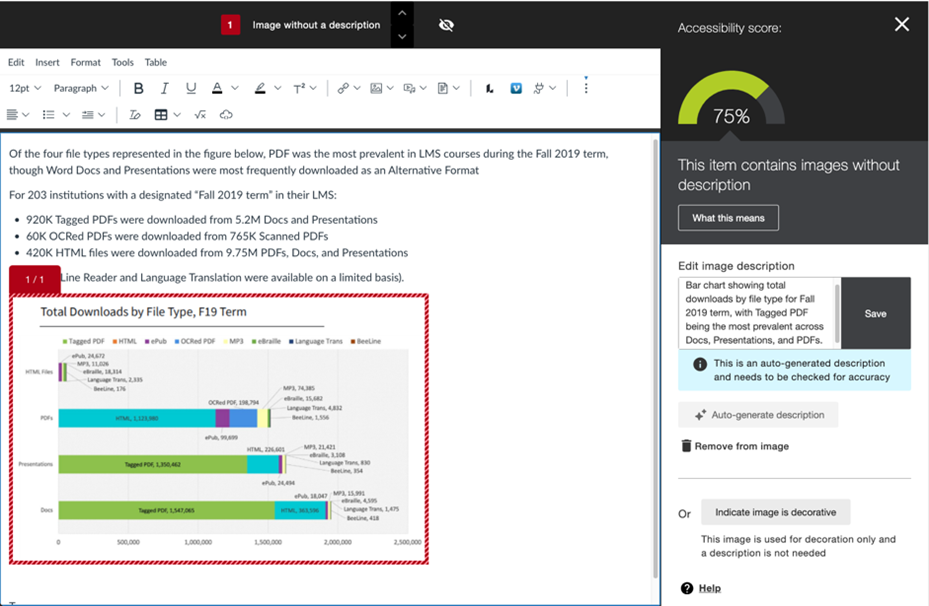
Read more about how Anthology has further improved the AI Alt Text Assistant in Ally.
3. Check Your Heading Structure
Clear, consistent heading structure isn’t just good design—it’s essential for students who use assistive technology to navigate content. It also helps all students quickly review and find what they need more easily.
How Ally helps: Ally scans your course documents for heading issues and helps you correct them, so your materials follow best practices for structure and organization. You can apply headings via the Blackboard text editor or edit your files to include headings. For example, check out our Accessible Syllabus guide for information on adding headings in Microsoft Word.
Bonus Tip: Let Students Know About Alternative Formats
Many instructors don’t realize that Ally also benefits students directly. Learners can download course materials in formats that best suit their needs—including audio, HTML, ePub, and immersive reader versions.
These features aren’t just for students with formal accommodations. They’re designed to support every learner, whether they prefer listening to content on the go, reading on a phone, or using a screen reader.
To help your students understand what’s available and how to use it, check out our Ally communication toolkit for a message you could share via email or an Announcement. You can also share our student guide to using Ally or add a link to this video on Ally for Students to your course. Consider adding a general accessibility statement to your syllabus that also guides students on how to access alternative content through Ally (a sample is available in the communication toolkit).
All in on Accessibility
These small steps can have a big impact; they can dramatically improve your course’s accessibility and help your students start the semester with confidence.
Want to see what’s next for Ally? Watch the recording of the Ally roadmap that Anthology delivered on August 20, 2025, to learn about the improvements they are working on to make accessibility easier than ever.
