

Zoom has introduced several new features to provide a better educational experience for faculty and students: enhancements for Chromebook, audio sharing in breakout rooms, video messages in chat, renaming students in the waiting room, and enhanced polling.
Chromebook

In the Zoom for Chrome Progressive Web Application (PWA), virtual backgrounds including blurred background are now available to provide students with a more equitable, privacy-minded video sharing experience.
Breakout Rooms
Faculty can now share audio and video from the main room into breakout rooms. Faculty can also preassign students to breakout rooms through Blackboard course roster with the Zoom LTI integration.

Zoom Chat
Participants and hosts can now record videos up to three minutes long and post them to the Zoom Chat. One example of use case is for students to submit video assignments in real time in synchronous class sessions or asynchronously outside of class using the Zoom Chat tab. Additionally, faculty can record video responses or feedback and post them to the chat.

Waiting Room
Faculty can now rename students in the waiting room. Use cases include changing student names to affirm a student’s gender identity and proper name or to employ student anonymity by masking student names from each other or other participants.

Polls
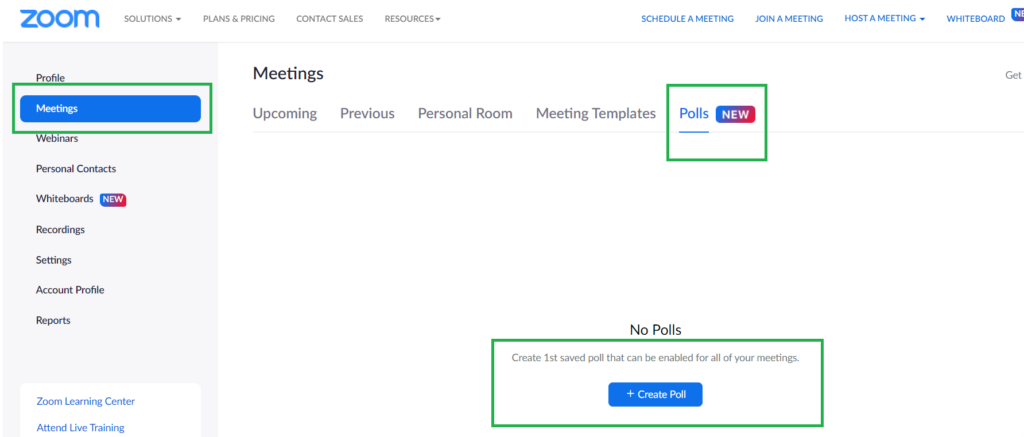
Polling content can be housed in a central library instead of associated with a particular meeting so polls can be set up ahead of time and accessed from any meeting associated with your account. Faculty will be able to reuse their polls across classes without having to duplicate them in each synchronous class meeting.
Read more and stay up to date on Zoom updates and features by visiting the Zoom Blog.
